
How to build a Salesforce AI context layer as a custom object
Build a Salesforce AI context layer with an admin-maintained custom object for allowed objects, field guidance, business rules, and Apex enforcement.
On this page
- Use a custom object before you reach for a bigger prompt
- The object model
- Start with object access
- Enforce the whitelist in Apex, not in the prompt
- Add business rules where the model usually guesses
- Record types change what a field means
- The failures Salesforce won't warn you about
- Load an index, then fetch the bodies
- Retrieval with Apex
- Wire it into an MCP server
- When the population moves between objects
- Permissions decide the answer
- How this fits with Agentforce
- Test the layer by forcing a before-and-after
- Maintain it like an operating asset
- Related implementations
A Salesforce AI context layer is an admin-maintained policy and business-logic layer that sits between an AI agent and your Salesforce data.
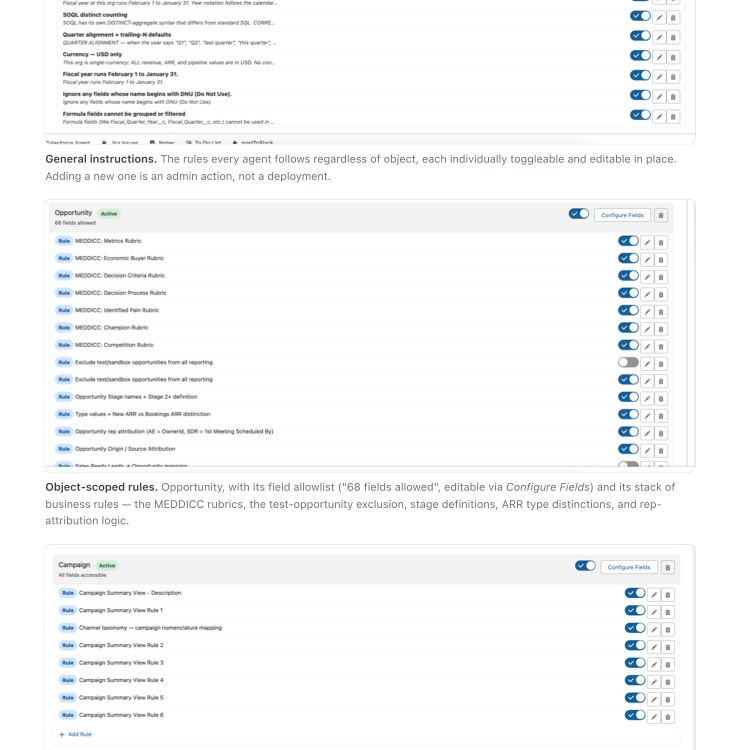
In this implementation, the source of truth lives in Salesforce as records. Admins can maintain allowed objects and fields, definitions, exclusions, and other operating guidance without editing code or stuffing the full rules library into a prompt.
This is the Salesforce implementation of the broader CRM AI context layer.
Salesforce can already retrieve records, related lists, flows, Apex outputs, and Data Library content for Agentforce and Prompt Builder. That part is useful. The gap is different: the model still doesn't know which fields are trusted, which objects it may query, which records should be excluded, or how your team defines terms like "qualified pipeline" or "at risk."
That's what the custom object is for.
Use a custom object before you reach for a bigger prompt
A Salesforce AI context layer has to change as the business changes.
Fields get deprecated. New ARR definitions change. Sales stages get renamed. A formula field that was safe for display turns out to be wrong for grouping. Someone adds a test account that should never show up in pipeline reporting.
If those rules live only in code or prompt text, every fix becomes a developer task. If they live as Salesforce records, an admin can update them the same way they update the rest of the GTM system.
The other benefit is token management. An MCP server doesn't need to send the entire guidance payload with every question. It can check the custom object first, pull only the active rules for the objects and fields it plans to query, and send that smaller set to the model.
Said less like a systems diagram: the agent asks for the few notes it needs instead of dragging the whole binder into every conversation.
That's the main design choice:
| Option | Works for | Problem |
|---|---|---|
| System prompt | Delivery layer for the rules needed right now | Becomes unmaintainable if it holds the whole rule library |
| Custom metadata | Packaged configuration | Harder for non-developers to maintain in a normal UI |
| Custom object | Living business rules | Requires a little object design up front |
For a real GTM team, I'd start with the custom object as the source of truth. The prompt is still the delivery format.
Custom metadata can still be useful later if you want to package defaults, seed a sandbox, or move a stable set of rules between orgs. But the working layer should feel like Salesforce data, not hidden application config.
The object model
Create one custom object for agent guidance rules. The exact API name doesn't
matter; something plain like AI_Guidance_Rule__c is better than a clever internal
name.
You'll want to separate the jobs the rules perform:
| Rule kind | What it defines | Example |
|---|---|---|
| General instruction | Rules every agent should follow | Fiscal calendar, currency assumptions, fields that should never be used |
| Allowed object | Which objects agents may query | Account, Contact, Opportunity, Case, Task |
| Business rule | Object-scoped definitions and exclusions | What "Stage 2+" means, how to exclude test opportunities, how rep attribution works |
Use a picklist for that, not record types. Record types drag in profile assignment and page-layout surface for no benefit here, and they make the object harder for an admin to own. The whole point is that a RevOps lead can add a rule without filing a ticket. A picklist keeps it that way.
Then add the fields that make the records operational:
| Field | Type | Why it matters |
|---|---|---|
Rule_Id__c | Text, unique | Stable handle for logging and fetch-by-id retrieval |
Title__c | Text, required | The retrieval key. Written as a trigger, not a label |
Rule_Text__c | Long text | The actual instruction the agent receives |
Rule_Kind__c | Picklist | General instruction, allowed object, business rule |
Rule_Category__c | Picklist | Definition, exclusion, attribution, reporting view, anti-pattern |
Applies_To__c | Multi-select or child records | The objects this rule governs. One rule often covers several |
Depends_On__c | Text | Rule IDs to pull automatically when this one loads |
Field_Allowlist__c | Long text or child records | Lists the fields the agent may read for an object |
Filter_Fragment__c | Text | The literal SOQL predicate, when the rule has one |
Version__c | Number | Attribute a regression to a specific rule revision |
Approval_Status__c | Picklist | Draft, Active, Retired. Review before a rule reaches production |
Active__c | Checkbox | Retire a rule without deleting history |
Sort_Order__c | Number | Keep the assembled prompt stable and predictable |
Priority__c | Number | Rules will conflict. Decide resolution on purpose |
Effective_From__c / Expires_On__c | Date | Fiscal-period rules that are only correct inside a window |
Source__c | Long text | Where the rule came from, so someone who wasn't there can review it |
Owner_Team__c | Picklist | Makes maintenance ownership visible |
Last_Reviewed__c | Date | Keeps stale rules from becoming invisible infrastructure |
Two of those do more work than the rest.
Title__c is the one people leave out, and leaving it out quietly caps how large
your library can get. In a phased retrieval design the agent decides whether to
fetch a rule from its title alone, so the title has to state the condition under
which the rule matters. Opportunity exclusions is a folder name and gets skipped.
Exclude system-generated and test opportunities from all pipeline and win-rate reporting gets fetched. Make the field required and write it like a trigger.
Applies_To__c has to be multi-value. A single Scope_Object__c text field forces
you to duplicate a rule per object or encode the cross-object part in prose, and
prose isn't something the retrieval layer can follow.
Beyond that, keep the schema boring. The value is in the rules, not in an elaborate data model.
Start with object access
Before the agent gets field context, decide which Salesforce objects it's allowed to query at all.
That whitelist should be explicit.
If the user asks for a pipeline answer, the agent shouldn't roam the org looking for objects with promising names. It should have a known list of allowed objects and a known list of allowed fields for each one.
For each allowed object, store:
- The Salesforce object API name.
- A plain-English description of when the object should be used.
- The fields the agent may read.
- Fields it must not use, even if they appear in layouts or reports.
- Relationship notes the agent needs to join the dots correctly.
This is where a lot of CRM AI work gets sloppy. Access to Salesforce data isn't the same thing as permission to use every field the model can see.
Enforce the whitelist in Apex, not in the prompt
Here's where I need to correct something this guide used to say.
Telling the agent "if the object isn't allowlisted, stop and say what's missing" is
guidance text. It's a soft control. It works most of the time, and the times it
doesn't are the ones you never find out about: the agent can't reach Contract, so
it answers from Opportunity instead and nobody sees an error.
Put the boundary in code:
public with sharing class GuidanceGate {
    public class BlockedException extends Exception {}

    /**
     * Validates a query plan before it runs. Guidance text explains meaning;
     * this method decides what is permitted. Anything not explicitly allowed
     * by an active Allowed Object rule is rejected, never approximated.
     */
    public static void assertAllowed(String objectApiName, Set<String> fields) {
        Map<String, Set<String>> policy = GuidanceRuleService.allowedObjectPolicy();

        if (!policy.containsKey(objectApiName)) {
            throw new BlockedException(
                objectApiName + ' is not an allowed object for agent queries.'
            );
        }

        Set<String> denied = new Set<String>(fields);
        denied.removeAll(policy.get(objectApiName));

        if (!denied.isEmpty()) {
            throw new BlockedException(
                'Fields not on the allowlist for ' + objectApiName + ': ' +
                String.join(new List<String>(denied), ', ')
            );
        }
    }
}
Three things this buys you that a prompt sentence doesn't. The agent gets a real error it has to handle instead of a suggestion it can rationalize past. The refusal is identical every time, so it's testable. And the check runs against the final query plan, after the model has finished reasoning, which is the only moment that actually matters.
Plain version: the model can suggest a query. Apex gets the final veto.
Run the MCP connection as the asking Salesforce user so their profile, permission sets, FLS, sharing, and role hierarchy remain the first security boundary. Then apply the context object's allowlist as a second, universal AI boundary. A user having access to an object or field does not mean the agent may use it; both gates have to agree.
Your guidance allowlist is a semantic policy layered on top of Salesforce CRUD, FLS, and sharing. It doesn't replace any of them. Both layers have to exist and they have to agree.
Add business rules where the model usually guesses
Don't try to document the whole org.
Start with the places where a smart human would say, "You need to know how we use that field."
Good first rules:
- Fiscal year boundaries.
- Opportunity exclusions.
- Stage definitions.
- Rep attribution.
- Lead-to-contact conversion behavior.
- Account-health interpretation.
- Scoring thresholds.
- Campaign channel taxonomy.
- Fields marked "don't use".
- Formulas or multi-select picklists that shouldn't be grouped.
The pattern is simple:
ruleId: R-018
ruleKind: BusinessRule
appliesTo: [Opportunity]
category: Exclusion
version: 3
active: true
sortOrder: 30
title: >
  Exclude system-generated and test opportunities from all pipeline, win-rate,
  and forecast reporting
ruleText: >
  Before running any query on Opportunity, add these filters unless the user has
  explicitly asked for operational testing records:
  Type != 'Internal Test', IsSandboxSeed__c = false, and Account.Name does not
  start with 'ZZ'.
filterFragment: "Type != 'Internal Test' AND IsSandboxSeed__c = false"
Two details in there matter more than the rule itself.
Ship the query with the fact. filterFragment carries the literal
predicate. A prose definition of an exclusion gets re-derived on every run and
mis-derived on some of them. A predicate is deterministic.
Write exclusions as pre-flight instructions. "Test records are excluded from reporting" is a description, and descriptions get read and ignored. "Before running any query on Opportunity, add these filters" is an instruction to perform, and compliance goes up sharply. Same information, different verb mood.
Record types change what a field means
This one is specific to Salesforce and it catches people who did everything else right.
The same field on the same object can mean different things across record types. A
Type__c picklist on Opportunity might carry renewal semantics for one record
type and services semantics for another. A close date might be a contract date in
one business unit and a go-live date in another.
An agent that doesn't know record types exist will happily aggregate across all of them. The number comes back. It's meaningless.
So scope those rules explicitly:
ruleId: R-052
appliesTo: [Opportunity]
category: Definition
title: >
  Read Opportunity.Amount as annual contract value on New Business and as total
  project fee on Professional Services
ruleText: >
  Amount is not comparable across record types. Filter to a single RecordType
  before summing Amount, and state which record type the total covers. Never
  present a blended Amount total across New Business and Professional Services.
The failures Salesforce won't warn you about
The expensive mistakes are the ones that return a result. An error gets fixed in five minutes. A plausible number gets presented to a VP.
Give those their own rule category, because they don't look like exclusions or definitions:
Formula fields. Salesforce blocks grouping on most formula fields in reports, and the restriction surprises people because the field is otherwise perfectly authoritative. An agent building an aggregate either fails in a way it doesn't understand or invents a workaround. Write the rule once per formula field that matters: readable, never groupable.
Multi-select picklists. Grouping by one returns a distribution over the stored
combinations, not over the individual values. Cloud;Security counts as its own
bucket. The output looks like a valid breakdown and every number in it is wrong.
Roll-up and cross-object aggregates. Some of these the platform reshapes rather than rejecting. If your team already knows a particular aggregate lies, that's a rule, and nobody will remember it in six months.
Load an index, then fetch the bodies
At runtime, the agent should load only the rules needed for the job.
The obvious version is "filter rules by the object in scope." That's the right instinct and it stops working sooner than you'd expect, because scope-filtering still loads the full body of every rule attached to that object, and rules pile up on exactly the objects people ask about most. Once Opportunity has sixty rules, your filtered payload is the whole problem again.
Split retrieval into three phases:
- Always load. General instructions, every exclusion and safety rule, and the allowed-object list with its field allowlists. Small, universal, cheap.
- Index only. Every active rule as ID, title, scope, category, and version. No bodies. This caches for the whole session.
- Fetch on demand. Full rule text by ID, only for the rules this question actually touches.
The simple version: load the safety rules, show the agent the table of contents, then fetch the pages it points to.
The asymmetry in step 1 is the part to get right. Interpretation rules are safe to lazy-load; if the agent skips the rule explaining how to read a score, the worst case is it reads the score naively and says so. Exclusions are different, because an agent that doesn't know an exclusion exists can't decide to fetch it. There's no gap for it to notice. It runs the query, gets a number that includes every test record in the org, and reports it with complete confidence.
So exclusions never lazy-load. They ride along in phase 1, every question, whatever object is in play.
A phase-1 payload stays compact:
# General instructions
- Use the configured fiscal calendar when grouping by quarter or year.
- Don't use fields marked deprecated, DNU, or non-authoritative.
- Load guidance once per session. Don't re-fetch it on every turn.
- State the rules you applied, the exclusions you applied, the exact date range,
  and whose permissions the query ran under.

# Always-on exclusions
- R-018: Before running any query on Opportunity, add Type != 'Internal Test'
  AND IsSandboxSeed__c = false.

# Allowed object: Opportunity
The agent may query Opportunity for pipeline, forecast, renewal, and deal-risk questions.

Allowed fields:
- Id, Name, AccountId, OwnerId, StageName, Amount, CloseDate, CreatedDate, LastActivityDate

# Rule index (fetch bodies by ID as needed)
- R-024 | Opportunity | definition   | v2 | Count only Stage 3+ opportunities with a future close date as qualified pipeline
- R-031 | Account     | attribution  | v1 | Credit the account owner at time of close, not the current owner
- R-047 | Opportunity | anti-pattern | v1 | Never group or filter on Solution_Fit__c; it is a formula field
- R-052 | Opportunity | definition   | v1 | Read Amount as ACV on New Business and total project fee on Professional Services
The agent sees a small, relevant payload and knows what else exists. Admins see records they can edit.
Retrieval with Apex
The Apex layer doesn't need to be complicated. Its job is to return active rules in a stable order, in three shapes: what always loads, what the index looks like, and how to pull a body by ID.
public with sharing class GuidanceRuleService {

    private static final Set<String> ALWAYS_ON = new Set<String>{
        'General instruction', 'Exclusion', 'Anti-pattern'
    };

    /** Phase 1: the rules that ship with every question, regardless of scope. */
    public static String alwaysOn() {
        List<AI_Guidance_Rule__c> rules = [
            SELECT Rule_Id__c, Title__c, Rule_Text__c
            FROM AI_Guidance_Rule__c
            WHERE Active__c = true
              AND Approval_Status__c = 'Active'
              AND Rule_Category__c IN :ALWAYS_ON
              AND (Effective_From__c = null OR Effective_From__c <= TODAY)
              AND (Expires_On__c = null OR Expires_On__c >= TODAY)
            ORDER BY Priority__c DESC NULLS LAST, Sort_Order__c ASC, Rule_Id__c ASC
        ];

        List<String> sections = new List<String>();
        for (AI_Guidance_Rule__c rule : rules) {
            sections.add(rule.Rule_Id__c + ': ' + rule.Title__c + '\n' + rule.Rule_Text__c);
        }
        return String.join(sections, '\n\n');
    }

    /** Phase 2: titles only. Small enough to cache for a whole session. */
    public static String index() {
        List<String> lines = new List<String>();
        for (AI_Guidance_Rule__c rule : [
            SELECT Rule_Id__c, Title__c, Applies_To__c, Rule_Category__c, Version__c
            FROM AI_Guidance_Rule__c
            WHERE Active__c = true
              AND Approval_Status__c = 'Active'
            ORDER BY Sort_Order__c ASC, Rule_Id__c ASC
        ]) {
            lines.add(String.join(new List<String>{
                rule.Rule_Id__c,
                String.valueOf(rule.Applies_To__c),
                String.valueOf(rule.Rule_Category__c),
                'v' + String.valueOf(rule.Version__c),
                rule.Title__c
            }, ' | '));
        }
        return String.join(lines, '\n');
    }

    /** Phase 3: bodies by ID, plus anything they declare a dependency on. */
    public static String fetch(Set<String> ruleIds) {
        Set<String> wanted = new Set<String>(ruleIds);

        for (AI_Guidance_Rule__c rule : [
            SELECT Depends_On__c FROM AI_Guidance_Rule__c
            WHERE Rule_Id__c IN :ruleIds AND Depends_On__c != null
        ]) {
            wanted.addAll(rule.Depends_On__c.split(','));
        }

        List<String> sections = new List<String>();
        for (AI_Guidance_Rule__c rule : [
            SELECT Rule_Id__c, Title__c, Rule_Text__c, Filter_Fragment__c, Version__c
            FROM AI_Guidance_Rule__c
            WHERE Rule_Id__c IN :wanted AND Active__c = true
            ORDER BY Sort_Order__c ASC
        ]) {
            String body = rule.Rule_Id__c + ' (v' + rule.Version__c + '): ' +
                          rule.Title__c + '\n' + rule.Rule_Text__c;
            if (String.isNotBlank(rule.Filter_Fragment__c)) {
                body += '\nFilter: ' + rule.Filter_Fragment__c;
            }
            sections.add(body);
        }
        return String.join(sections, '\n\n');
    }
}
The fetch method pulling Depends_On__c is small and it's the piece that keeps
cross-object rules from getting stranded. If the qualified-pipeline definition
depends on the exclusion rule, asking for one gets you both.
Wire it into an MCP server
If your Salesforce access runs through an MCP server, load guidance before running SOQL.
The flow should be:
- Parse the user's question and decide which objects it starts on.
- Load phase 1 and the phase-2 index.
- Fetch bodies for the rules whose titles match the question.
- Build a SOQL plan using allowed objects and fields.
- Validate the finished plan through
GuidanceGate.assertAllowed. - Query Salesforce.
- Answer, naming the rules and exclusions applied.
Step 3 isn't a one-time event, and this is the part most builds get wrong. Questions don't stay on one object. Someone asks about pipeline and the plan grows an Account join halfway through to get the segment. If rules were loaded once at the start, the Account rules were never fetched and the agent doesn't know they exist.
So the server has to let the agent grab more rules mid-answer, before the next SOQL query runs.
So: before querying any object the plan didn't start with, fetch that object's rules. Mid-plan, not at the start. And if required guidance can't be loaded at all, stop or route to review. Answering on partial guidance is the failure this whole architecture exists to prevent.
When the population moves between objects
Salesforce's lifecycle model creates a reporting problem that no amount of field context fixes, and it's worth a rule of its own.
A lead converts. The record becomes a Contact, an Account, and usually an
Opportunity, and the original Lead is marked converted and largely left behind.
Ask "how many inbound inquiries did we get last year and what happened to them?"
and any query that lives on one object is wrong. Unconverted leads sit on Lead.
Converted ones have their outcome on Opportunity. The join runs through
ConvertedOpportunityId and ConvertedContactId, which the model will not guess.
The generalizable principle: whenever a population migrates between objects mid-lifecycle, every historical count is wrong unless the rule carries the query pattern that spans both. Telling the agent "leads convert to contacts" isn't enough. It has to ship the join.
ruleId: R-061
appliesTo: [Lead, Opportunity, Contact]
category: Definition
title: >
  Count full-funnel inbound volume across Lead and converted Opportunity, never
  from Lead alone
ruleText: >
  Inbound funnel questions must span both objects. Unconverted inquiries live on
  Lead with IsConverted = false. Converted ones carry their outcome on the
  Opportunity referenced by Lead.ConvertedOpportunityId. Counting Lead alone
  undercounts outcomes; counting Opportunity alone drops everything that never
  converted. Query both and join on ConvertedOpportunityId.
filterFragment: "SELECT Id, IsConverted, ConvertedOpportunityId, ConvertedContactId, CreatedDate FROM Lead WHERE CreatedDate = LAST_YEAR"
dependsOn: [R-018]
The same shape applies anywhere else a record changes objects: a quote becoming an order, a case escalating to a different object, a custom onboarding record that takes over from Opportunity at close.
Permissions decide the answer
None of this used to be in the guide, and it silently changes results.
Your connector should run as the asking user, which means the same question returns different answers for different people. That's correct behavior, and the model has no idea it's looking at a partial org. Add a global instruction: state whose permissions the query ran under, and never conclude "no records exist" from an empty result on a sharing-restricted object.
A permission-suppressed null is indistinguishable from a genuine blank. FLS and
your Field_Allowlist__c are two separate gates that both have to agree. A field
can be allowlisted in guidance and invisible to the running user through FLS.
Salesforce doesn't error. It returns null. The model reads that as "this account
has no renewal date" and reasons from there. Use WITH SECURITY_ENFORCED or
Security.stripInaccessible so the gap surfaces as an exception instead of a
plausible blank:
List<Account> accounts = [
    SELECT Id, Name, Renewal_Date__c, Renewal_Risk_Score__c
    FROM Account
    WHERE Id IN :accountIds
    WITH SECURITY_ENFORCED
];
Deploying a field grants nobody read access. Access is a separate permission-set or profile step. You'll deploy the guidance object, query it, get zero rows, and lose an afternoon to it. Every reader hits this once.
Decide who can read AI_Guidance_Rule__c itself. The rule text encodes your
thresholds, your exclusion logic, and your attribution policy. That's the operating
model of your GTM org in plain English. If the object inherits default org-wide
read, you've published it to every seat in the company, including the sales team
whose comp depends on those attribution rules. Set the org-wide default to Private
and grant read through a permission set.
How this fits with Agentforce
Use Salesforce's native grounding features where they help.
Agentforce and Prompt Builder can ground responses with CRM data, related records, Flow outputs, Apex, and other Salesforce-managed sources. That solves part of the retrieval problem.
This custom-object layer solves a different problem: business interpretation.
Salesforce can pass an Opportunity record to the model. It doesn't automatically know:
- Which custom fields are authoritative.
- Which fields were replaced but never removed.
- How your team defines each stage.
- Which operational records should be excluded from reporting.
- Whether an AI score can override a human-owned score.
- Which object becomes the source of truth after conversion.
Put those rules in the guidance object. Then use Agentforce, Apex, Flow, or MCP to load them when the agent needs them.
Test the layer by forcing a before-and-after
Pick a question where the model normally gives a plausible but wrong answer.
Run it twice:
- raw Salesforce data only;
- raw Salesforce data plus the relevant guidance records.
You're looking for a reasoning change.
Before context, the model might:
- Group by a field Salesforce can technically return but the business shouldn't use;
- Count test records as real pipeline.
- Attribute credit to the wrong owner field.
- Trust a deprecated score because the label sounds official.
After context, it should:
- Name the rule it applied.
- Ignore non-authoritative fields.
- Use the allowed fields only.
- State exclusions before giving totals.
- Explain where the answer depends on a business definition.
If the final answer is more polished but makes the same assumption, the context layer isn't working yet.
That comparison is a good teaching device and a bad regression system. Once you're past a dozen rules, graduate to a golden-question set: a fixed, versioned list of questions you run before and after every rule change, with at least one question per rule that fails without it. The Salesforce-specific ones worth adding early are grouping by a formula field, grouping by a multi-select, a fiscal-quarter comparison, and a full-funnel question that has to cross the Lead-to-Opportunity boundary.
Maintain it like an operating asset
The best rules usually come from errors.
An agent gives the wrong answer. Someone identifies the assumption it made. You add or update a guidance record so that mistake doesn't recur.
That feedback loop is the point, and it only works if you can reconstruct the failure. Log the guidance version and the rule IDs loaded on every run, alongside the objects and fields the plan actually queried. Without that, a bad answer reported three days later is just a story.
Add a lightweight review process:
- Every new rule gets an owner.
- Retired rules are deactivated, not deleted.
- Important rules get a review date.
- Rule text changes and retrieval changes ship separately, so a regression is attributable to one of them.
- Changes are tested against the golden set on both sides.
Over time, the layer becomes a map of how the GTM system actually works. Not the schema. Not the page layout. The operating rules.
Related implementations
- The pillar guide explains the concept.
- Salesforce Einstein, Agentforce, or custom CRM AI maps the current native and custom architecture choices.
- The HubSpot version covers both file-backed guidance and a HubSpot custom object.
- The portable version keeps the layer outside any one CRM.